
Our Work/Case Study/Field Sales
SS Enterprises Sales.
A field sales tracker for the mattress and foam division of SS Enterprises. Salesmen book orders at the dealer's counter, the office approves them from one queue, and every visit and order rolls up into a report for each salesman and territory.
(01) — Summary
At a glance.
A distributor with salesmen on the road
SS Enterprises sells mattresses and foam to furniture shops and bedding stores across North Bengal and Bihar through its own field team.
Orders arrive by phone and paper
Salesmen call or message orders in; the office retypes them, nobody knows how many shops were visited, and approvals happen in chats.
One app for the road and the office
Salesmen book orders on their phone; the office approves them, keeps the party and item lists, and sees who visited and sold what.
(02) — Background
Sales happen at the dealer's counter.
A salesman covering Kishanganj and Islampur visits a dozen furniture shops a day. Every order he takes has to reach the office correctly — and every visit that ends without one matters too.
“Maa Durga Furniture — 3 EPE rolls, 4 ortho mattresses.” Sent on WhatsApp at 6 pm. Retyped the next morning, approved over a phone call, and never counted in anyone's numbers.
Field salesman
Visits dealers in his territory, books orders and adds new shops from the road.
Sales office
Approves or rejects orders with a remark, and maintains the party and item lists.
Business owner
Compares salesmen and territories by visits, orders, quantity and strike rate.
Furniture & bedding store
Places orders with the salesman who visits the shop.
(03) — The Problems
Where field sales go dark.
The gaps between the road and the office in a distributor's sales team.
Orders retyped
Orders taken in the field are typed again at the office, with mistakes in items and quantities.
Approvals in chats
Whether an order was approved — and why one was rejected — lives in phone calls.
Visits nobody counts
A day of visits that produces no orders leaves no record at all.
New shops off the list
Salesmen meet new dealers on the road, but the office's party list never hears about them.
No way to compare salesmen
Without visit and order counts, territories and salesmen can't be compared fairly.
Two product lines, one list
Mattresses and foam sell differently, but orders mix them together.
(04) — Goals
What success looks like.
Orders entered once, in the field
The salesman's order is the order the office sees.
One approval queue
Approve or reject every order, with a remark, from one screen.
Shared master lists
Parties and items kept by the office, with field additions marked.
Visits and strike rate
Store visits, orders and quantity per salesman, by day, week or month.
Right access for each role
Admins see everything; each salesman works his own territory.
(05) — The Solution
From the dealer's counter to the office queue.
Five tabs — Approvals, Orders, Masters, Reports and Users — on a phone-first app.
Every order, with who took it and where
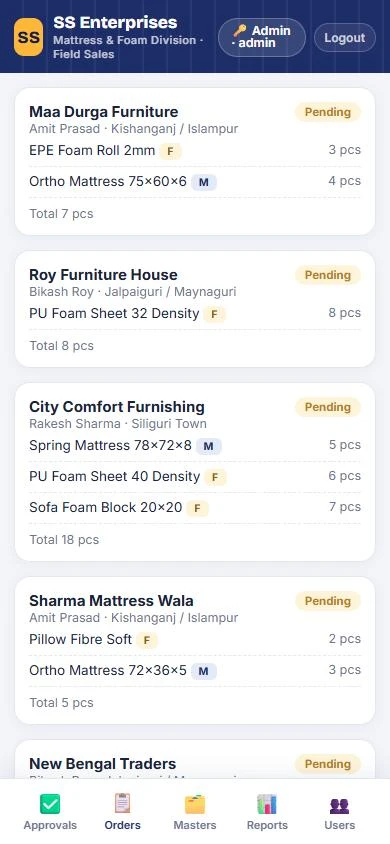
Orders arrive from the field with the dealer's name, the salesman and his territory, and each item tagged as a mattress or foam product with its quantity — so the office never has to retype them.
- Salesman and territory on every order
- M and F tags for mattress and foam lines
- Total pieces worked out per order
One queue to approve or reject
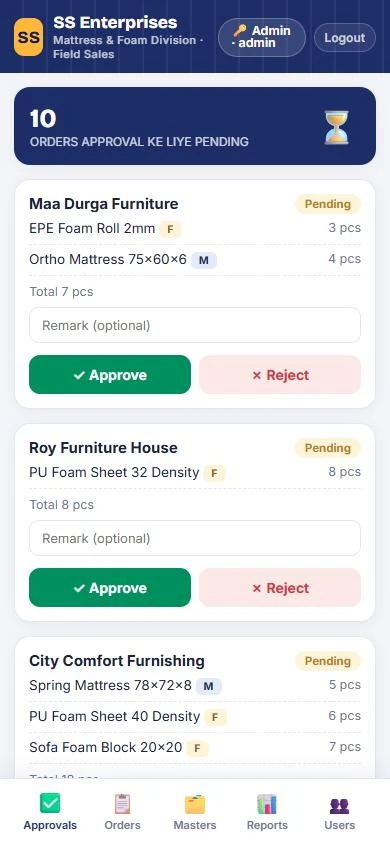
The office opens on the number of orders waiting — “orders approval ke liye pending” — and works down the list, approving or rejecting each one with an optional remark that stays with the order.
- Pending count at the top
- Approve or reject in one tap
- A remark recorded with the decision
Master lists the field can add to
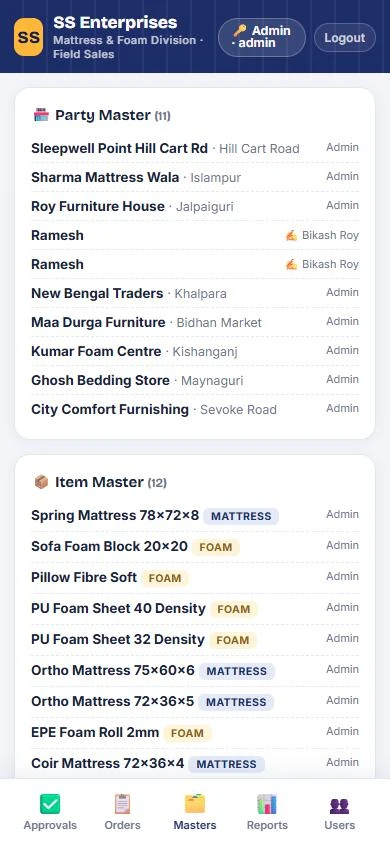
The office keeps the party master — every dealer and its area — and the item master of mattresses and foam products. When a salesman adds a new shop or item from the road, it appears with his name beside it, so the office can check it.
- Party master with each dealer's area
- Item master by mattress or foam
- “Parties field se aayi hain” — field additions flagged
Reports
Daily, weekly or monthly — for all salesmen or one — showing store visits, orders taken, total quantity and strike rate, with a salesman-wise summary and a detail table.
Territories
Siliguri Town, Jalpaiguri / Maynaguri and Kishanganj / Islampur, each with its own salesman.
Users
An admin who sees all salesmen, and a login for each salesman tied to his own name.
(06) — How It Works
Visit, order, approve, report.
Each order moves from the salesman's phone to the office queue to the reports.
An order from City Comfort Furnishing on Sevoke Road — five spring mattresses, six PU foam sheets and seven sofa blocks — reaches the office queue with Rakesh Sharma's name on it, ready to approve.
(07) — Design Decisions
Choices that fit a field team.
Count the visit, not just the sale
Strike rate — orders per store visit — shows how well a salesman converts, not only how much he sells.
Approval is a step, not a call
Every order waits in one queue, and every decision carries a remark, so nothing is approved off the record.
Let the field grow the lists
Salesmen can add new dealers on the spot; marking them by name keeps the office in control.
Tag the product line
A simple M or F on every item keeps mattress and foam sales apart without separate apps.
Speak like the team
“Orders approval ke liye pending”, “parties field se aayi hain” — the app uses the words the sales team already uses with each other.
(08) — Conclusion
From WhatsApp orders to one sales desk.
Every order taken in the field reaches the office as entered, is approved on the record, and counts towards the salesman who took it.
Gurugram · Plus Offices, Plot 65, Sector 44, Haryana 122003
Siliguri · Jewel Club Lane, Udham Singh Sarani - 734001