
Our Work/Case Study/Rental Operations
RentFlow.
A lead-to-fulfilment system for a laptop rental and sales business. Every client query moves through one pipeline — from sales to purchase for pricing, back to sales for the quotation, and on to the purchase order — with the right team alerted at each hand-off.
(01) — Summary
At a glance.
A rental business where two teams share every deal
Sales talks to the client; purchase finds the laptops and the price. Neither can close a deal without the other.
Deals stall in the gap between teams
A query waits for a price, a price waits for a quote, a quote waits for a follow-up — and nobody can see where it's stuck.
One pipeline with hand-offs built in
Each stage belongs to a team. Moving a lead alerts that team and creates their task, and the owner sees every rep and response time.
(02) — Background
Every quote needs two teams.
A company asks for twenty laptops for six months. Before sales can quote, purchase has to confirm the model, the spec and what it will cost.
The client wants a price today. Sales is waiting on purchase, purchase is chasing a supplier, and the owner only hears about it when the client calls to ask why nobody got back.
Business owner
Sees revenue, pipeline, every salesperson's win rate and the purchase team's response times — read-only, from one console.
Salespeople
Log client queries, send them for pricing, make and send quotations, and follow up to confirmation.
Purchase team
Price the requested equipment, then raise the purchase order once the client confirms.
Business customer
Asks for laptops on rent or to buy, with a model, spec, quantity and duration.
(03) — The Problems
Where deals go quiet.
The usual setup — queries on WhatsApp, prices on a spreadsheet, follow-ups in someone's head.
Pricing requests get lost
Sales asks purchase for a price in a chat. The message scrolls away and the client waits.
No one owns the next step
When a deal moves from one team to the other, it isn't clear who should act — so often no one does.
Follow-ups depend on memory
A quote goes out and is never chased, because there's no reminder that it's still open.
The owner can't see the pipeline
Which rep is converting, which client is waiting, how slow purchase is — none of it is visible without asking around.
History lives in chats
What was asked, what was priced and what was promised is spread across people's phones.
One process doesn't fit every business
Off-the-shelf CRMs assume one sales team and fixed stages, not a sales–purchase relay.
(04) — Goals
What success looks like.
Every query in one pipeline
Rent or sale, from the first call to a fulfilled order.
Hand-offs that announce themselves
When a lead reaches a team's stage, that team is told — automatically.
Nothing slips
Each stage creates the task it needs, and slow pricing gets flagged.
The owner sees everything
Revenue, pipeline, rep performance and purchase response times in one console.
A process the business can change
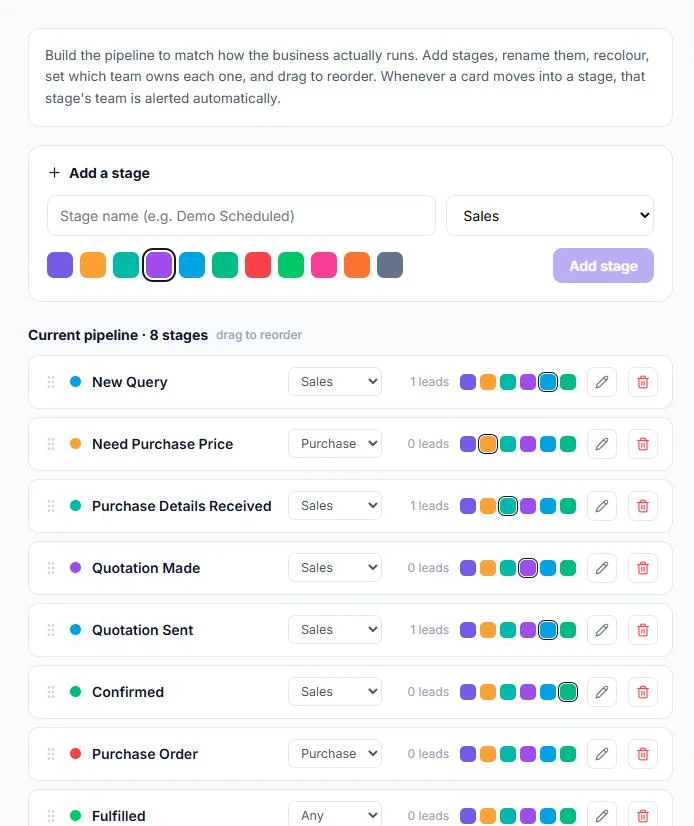
Stages, owners and colours editable without a developer.
(05) — The Solution
A relay with no dropped batons.
Every screen reads from the same pipeline — and every move on it tells the next person what to do.
A query captures everything purchase needs
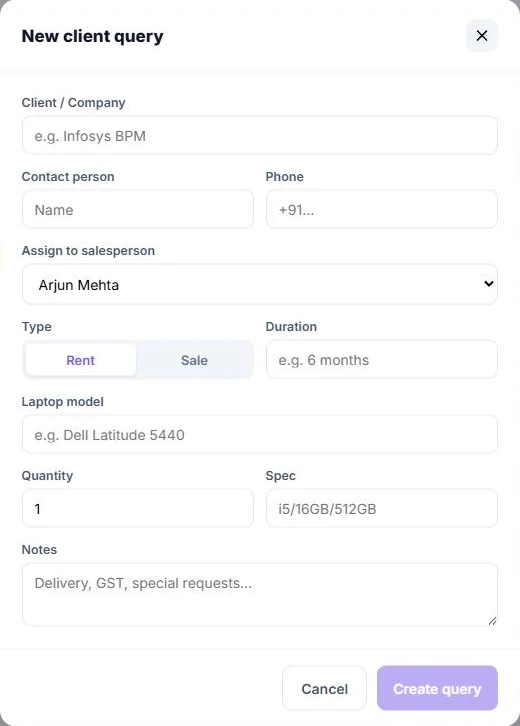
Sales logs a client query once: company, contact, phone, the salesperson who owns it, rent or sale, duration, laptop model, quantity, spec and notes such as delivery or GST. Purchase prices exactly what was asked for — no back-and-forth to find out.
- Rent or sale chosen up front
- Model, spec and quantity per request
- Every query assigned to a salesperson
Drag a card — the next team is alerted
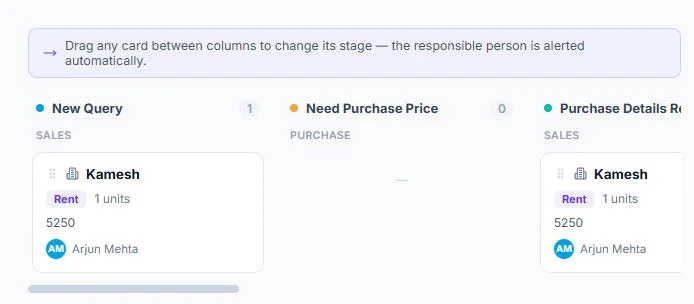
Leads sit on a board in columns, one per stage, each marked with the team that owns it. Dragging a card into a new column changes its stage and alerts the responsible person straight away.
- Sales and purchase columns side by side
- Owner, deal type and quantity on every card
- Search across clients and contacts
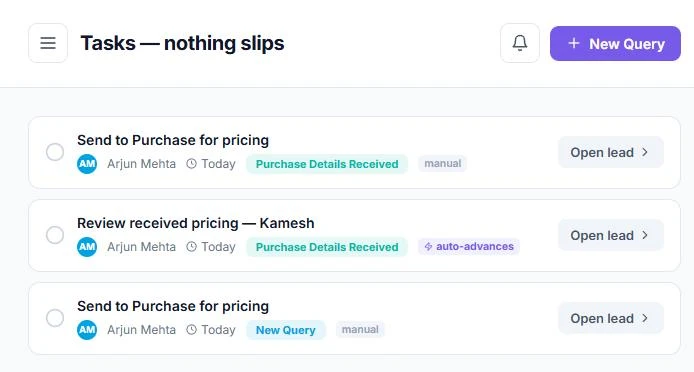
Tasks that create themselves
Each stage brings its own task — send to purchase for pricing, review the pricing received, make and send the quotation, follow up on the quote. Some are ticked off by hand; others close on their own when the lead moves on.
- Manual and auto-advancing tasks, clearly labelled
- Every task linked straight to its lead
- Open-task count on the menu and the owner console
The whole deal on one card
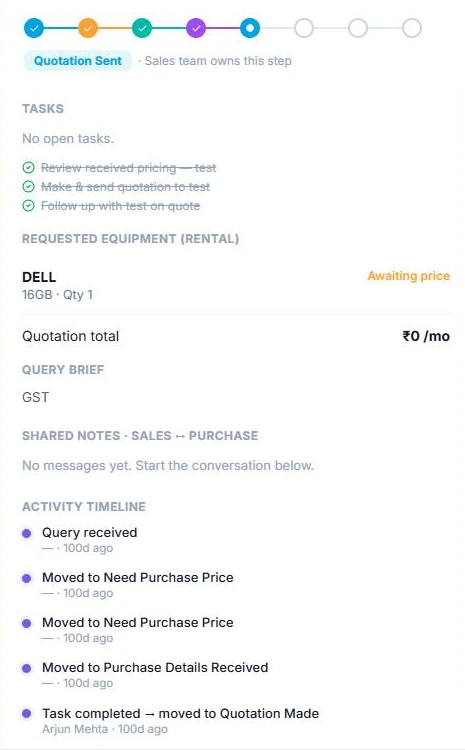
Opening a lead shows where it is on the eight-step tracker and which team owns the step, its tasks, the equipment requested and whether it's been priced, the quotation total, the query brief, shared notes between sales and purchase, and a timeline of every move.
- Shared sales ↔ purchase notes instead of side chats
- “Awaiting price” shown on each requested item
- Owner view is read-only oversight
Owner console
Confirmed revenue, open pipeline, open tasks and pricing overdue by more than four hours — then each salesperson's active leads, wins, win rate and value, and each purchase person's average response time.
Attention queue
A live list of leads that need someone now — for example, a quote sent long ago that's due a follow-up.
Quotations & POs
Quotations with their monthly value and stage, and purchase orders with client, items, order value and status.
(06) — How It Works
Query in, order out.
Eight stages, two teams. Each stage knows who owns it.
A new query goes to purchase for a price, comes back to sales for the quotation, and returns to purchase for the order once the client confirms — every crossing announced to the team on the other side.
(07) — Design Decisions
Choices that keep deals moving.
Give every stage an owner
A stage isn't just a label — it belongs to sales, purchase or any team, so there's never a question of whose move it is.
Make the alert part of the move
Moving a card and telling the next team are one action, so a hand-off can't happen silently.
Measure the hand-offs, not just the sales
Purchase response time sits next to sales win rate on the owner console, because a slow price loses deals too.
Oversight without interference
The owner sees everything in a read-only view and switches to a team only when they mean to act.
Let the business own its process
Stages can be added, renamed, recoloured, reassigned and reordered in settings. Deleting a stage that still has leads moves them to the first stage, so nothing is lost.
(08) — Conclusion
From chat threads to one flow.
Every query priced, quoted, followed up and fulfilled on one pipeline — with each team told when it's their turn, and the owner able to see exactly where every deal stands.
Gurugram · Plus Offices, Plot 65, Sector 44, Haryana 122003
Siliguri · Jewel Club Lane, Udham Singh Sarani - 734001