
Our Work/Case Study/Retail
Hisaab.
A billing app for kirana and small retail shops that starts from the one tool every shopkeeper already uses — the calculator. Work out the amount, add GST in one tap, send it to the bill, and share it on WhatsApp as cash or udhaar.
(01) — Summary
At a glance.
The shopkeeper at the counter
Kirana and general stores where billing happens on a calculator and a notepad, with a queue of customers waiting.
The calculator doesn't remember anything
The total is worked out, said out loud and gone — no bill for the customer, no record of the day, no track of udhaar.
A calculator that becomes the bill
The same keypad, with GST buttons and a “put it in the bill” button, a WhatsApp bill and a daybook behind it.
(02) — Background
Billing software is slower than a calculator.
Most billing apps start with item masters and invoice forms. At a busy counter, the shopkeeper just reaches for the calculator instead.
Twelve hundred plus GST, nine-forty-five for the atta — “total ₹2,361, bhaiya.” The customer pays, the calculator is cleared, and the sale is never written down.
Shop owner
Bills customers fast, keeps track of udhaar and sees the day's sale.
Helper at the counter
Uses the calculator they already know — no training needed.
Customer
Gets a clear bill on WhatsApp with the shop's name on it.
Growing shop
Pays for nightly cloud backup and restore on a new phone.
(03) — The Problems
What gets lost at the counter.
Small, everyday leaks in shops that bill by calculator.
GST worked out in your head
Adding 5, 12, 18 or 28% by hand is slow at a queue and easy to get wrong.
No bill for the customer
Customers increasingly ask for a bill, and a handwritten one looks unprofessional.
Udhaar on loose paper
Credit given to regulars is scribbled on a pad or remembered — and quietly forgotten.
No idea of the day's sale
Without a record, the evening total is a guess from the cash drawer.
Apps that slow the counter
Billing software wants item codes and forms; customers won't wait while you fill them.
A lost phone loses everything
If all the records live on one phone, a broken or lost phone means losing the shop's history.
(04) — Goals
What success looks like.
Start with the calculator
The first screen is a keypad, not a form.
GST in one tap
Every common GST rate is a button.
A bill without typing
The calculated amount moves into the bill as an item.
Cash or udhaar, recorded
Every bill marked as paid or on credit, and kept in a daybook.
Never lose the hisaab
Cloud backup, a data download and one-click restore.
(05) — The Solution
From keypad to WhatsApp bill.
Four tabs — Calculator, Bill, Daybook and Backup — each one a single step of a sale.
A calculator with GST built in
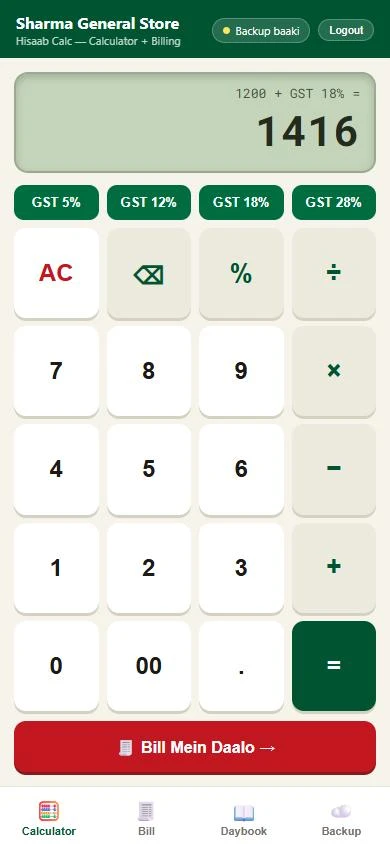
A full keypad with 00, percentage and backspace, plus four GST buttons — 5%, 12%, 18% and 28%. Tap one and the display shows the working (“1200 + GST 18% =”) and the answer, 1,416.
- GST added to any amount with one tap
- The calculation shown above the total
- “Bill Mein Daalo” sends the answer to the bill
Calculator to bill, without retyping
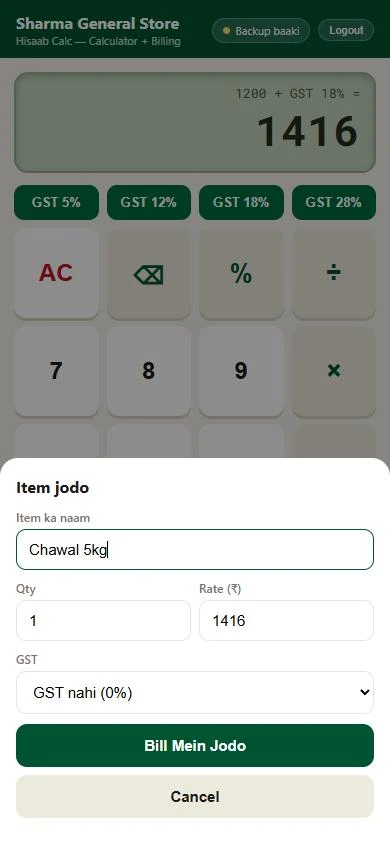
Sending an amount to the bill opens a small sheet with the rate already filled in. Type the item name, change the quantity or GST if needed, and it's on the bill. Items can also be added by hand.
- Rate carried over from the calculator
- Quantity and GST per item
- A running count on the Bill tab
Cash or udhaar — and the bill on WhatsApp
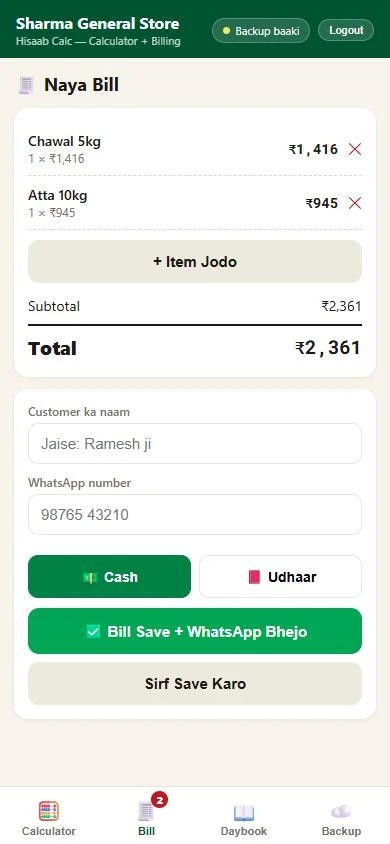
The bill lists each item with its quantity and rate, the subtotal and the total. Add the customer's name and WhatsApp number, mark it Cash or Udhaar, and save — with or without sending it to the customer on WhatsApp.
- “Bill Save + WhatsApp Bhejo” in one tap
- Udhaar recorded against the customer
- Shop name and phone printed on the bill
Backup that keeps the shop's history safe
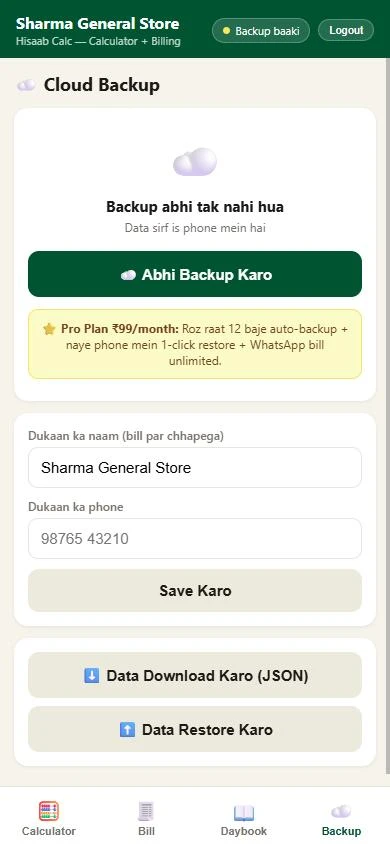
Bills are kept on the phone and can be backed up to the cloud with one tap. The header warns “Backup baaki” until it's done. A Pro plan at ₹99 a month adds automatic backup every night at midnight, one-click restore on a new phone and unlimited WhatsApp bills — and the data can always be downloaded or restored as a file.
- “Backup baaki” reminder in the header
- Nightly auto-backup on Pro
- Download and restore as JSON
Daybook
Today's sale, today's number of bills and today's udhaar at the top, with every bill of the day listed below.
Shop details
The shop's name and phone are set once and printed on every bill.
Separate shops
Each shop signs in to its own account, so several shops can use the app without mixing their records.
(06) — How It Works
Calculate, bill, send, back up.
A sale moves left to right across four tabs.
₹1,200 with 18% GST, then ₹450 × 2 with 5% GST, become a two-line bill for ₹2,361 — without typing a single price into a form.
(07) — Design Decisions
Choices that keep the queue moving.
Don't replace the calculator — upgrade it
The keypad looks and works like the one on the counter, so there's nothing new to learn before the first bill.
Make GST a button, not a sum
The four rates a kirana uses are always one tap away, and the working is shown so the customer can see it too.
Send the bill where the customer is
A WhatsApp bill needs no printer and lands in a chat the customer already has open.
Nag gently about backups
“Backup baaki” stays in the header until the shop's data is safe — a small prompt, not a blocking dialog.
Free to start, paid for peace of mind
Billing and the daybook work for free; the Pro plan charges for the thing a shop values most once it's hooked — never losing its records.
(08) — Conclusion
From calculator to bill book.
The tool the shopkeeper already trusts — now adding GST, making the bill, sending it on WhatsApp and keeping the day's hisaab, at the speed of the counter.
Gurugram · Plus Offices, Plot 65, Sector 44, Haryana 122003
Siliguri · Jewel Club Lane, Udham Singh Sarani - 734001