
Our Work/Case Study/Transport & Logistics
Fleet Dispatch.
A trip register and invoicing tool for transport businesses. Every trip is logged once — client, route, vehicle, driver, load and freight — tracked while it's on the road, and billed with GST the moment it's delivered.
(01) — Summary
At a glance.
Transport businesses billing by the trip
Fleet owners, trucking companies and 3PL providers moving loads for regular clients across states.
Delivered trips that never get billed
Trips live in diaries and WhatsApp; invoices are typed up later — and some completed trips slip through unbilled.
A trip register that becomes the invoice
Log each trip once. When it's completed, select it and the GST invoice is generated from the same record.
(02) — Background
Freight is earned on the road, paid on paper.
A transporter can run dozens of trips a month for the same few clients. The money only arrives once each one is invoiced correctly.
The lorry reached Kolkata on the 12th. The bill should have gone out the same week. By month-end nobody is sure which trips were invoiced and which weren't.
Fleet owner
Wants trips on the road, tonnes moved, revenue billed and freight still pending.
Dispatch desk
Logs each trip with client, route, vehicle, driver, load and freight.
Billing
Turns completed trips into GST invoices without retyping anything.
Shipper
Receives a clear tax invoice listing each trip, its route, vehicle and load.
(03) — The Problems
Where freight leaks.
The usual way of running a small fleet — a trip diary, phone calls with drivers and invoices made in a word processor.
Trips scattered everywhere
Route, vehicle, driver and freight for each trip are spread across diaries, chats and memory.
Unbilled deliveries
A completed trip that isn't invoiced is freight the business has earned and may never collect.
Invoices typed twice
Every invoice re-enters details that were already written down when the trip was booked.
Billing too early
Invoicing a trip still on the road invites disputes when the load arrives late or short.
GST worked out by hand
Calculating tax on each invoice by hand is slow and easy to get wrong.
No view of the month
Trips on the road, tonnes moved and money still to bill aren't visible in one place.
(04) — Goals
What success looks like.
One register of trips
Client, date, route, vehicle, driver, load, freight and status for every trip.
No delivered trip left unbilled
Every completed trip shows whether it has been invoiced.
Invoices without retyping
Select completed trips and the invoice is built from them.
Tax done for you
Subtotal, GST and total calculated on every invoice.
The month on one screen
Trips, tonnes, in transit, completed, pending freight and billed revenue.
(05) — The Solution
From trip log to tax invoice.
Three screens — overview, trips and invoices — all reading from the same register.
Log a trip in one form
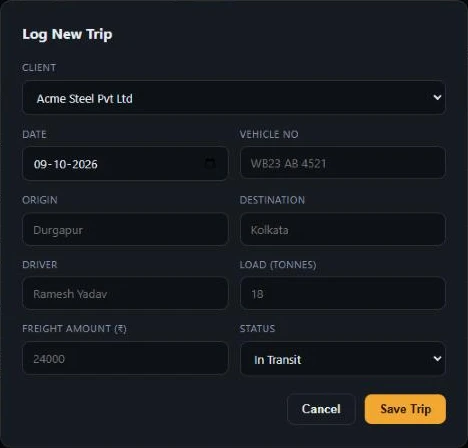
The dispatch desk records the client, date, vehicle number, origin and destination, driver, load in tonnes, freight amount and status. That one entry is everything the rest of the system needs.
- Clients picked from a list, not retyped
- Vehicle number and driver on every trip
- Status set to In Transit or Completed
A register that knows what's ready to bill
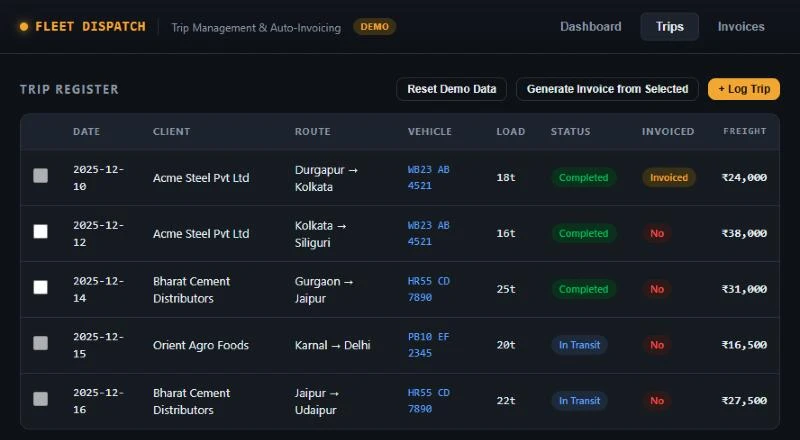
Every trip shows its route, vehicle, load, freight, status and whether it's been invoiced. Only completed, un-invoiced trips can be selected for billing — trips still in transit, or already billed, are locked out.
- Completed and In Transit status at a glance
- “Invoiced” or “No” on every row
- Select several trips for one client, then generate
Tax invoices built from the trips
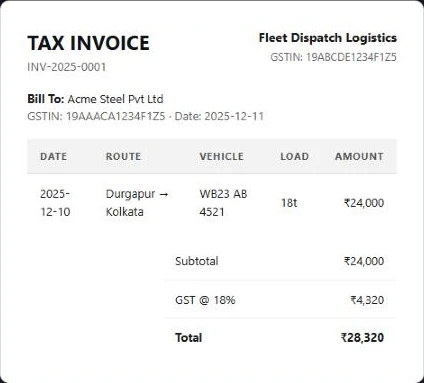
The invoice is numbered automatically and carries both GSTINs, the bill-to client and a line for each trip — date, route, vehicle, load and amount — with the subtotal, GST at 18% and total calculated. One click prints it.
- Sequential invoice numbers
- Seller and client GSTIN on the invoice
- Trips marked as invoiced once billed
The operation at a glance
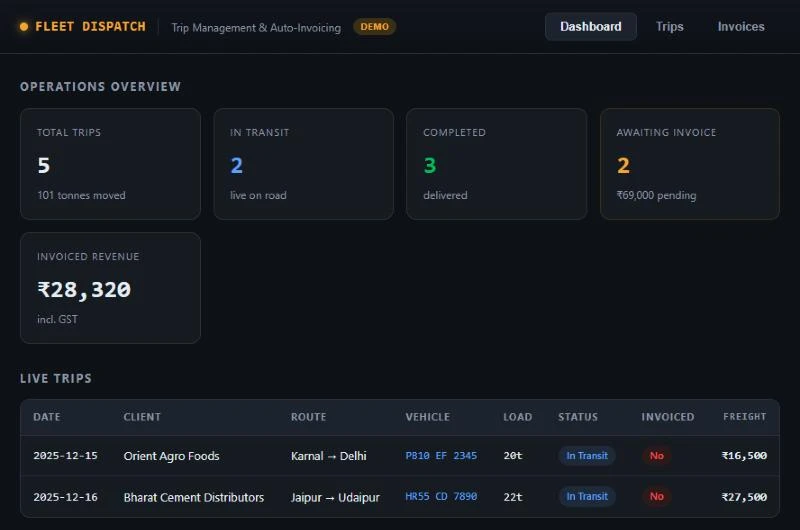
The overview shows total trips and tonnes moved, trips in transit and completed, freight awaiting invoice and revenue already invoiced including GST — followed by every trip currently on the road.
- “Awaiting invoice” with the pending amount
- Tonnes moved across all trips
- Live trips with client, route and vehicle
(06) — How It Works
Booked, delivered, billed.
A trip moves through three states, and the invoice comes from the trip itself.
The Durgapur → Kolkata trip of 18 tonnes, once completed, became invoice INV-2025-0001 for ₹28,320 — and moved from “awaiting invoice” to “invoiced revenue” on the overview.
(07) — Design Decisions
Choices that keep freight collected.
The trip is the source of truth
Every number on the invoice and the overview comes from the trip record, so nothing is typed twice.
Bill only what's delivered
Trips still in transit can't be selected for invoicing, which keeps disputes over undelivered loads out of the books.
Make unbilled money loud
“Awaiting invoice” sits on the overview with its rupee amount, so earned freight can't quietly go uncollected.
Several trips, one invoice
Regular clients get one invoice for many trips — select them together and generate once.
Built for the road, not the office
Vehicle numbers, routes and tonnes — the language of dispatch — are the columns, not an afterthought in a generic billing tool.
(08) — Conclusion
From trip diary to tax invoice.
Every trip logged once, tracked until it's delivered and billed with GST from the same record — so freight that's been earned is freight that gets invoiced.
Gurugram · Plus Offices, Plot 65, Sector 44, Haryana 122003
Siliguri · Jewel Club Lane, Udham Singh Sarani - 734001